Help · Integrations
API tokens
Making a token for your scripts and tools (a PSA, an RMM, Power Automate) to use Mygration as you, what it can and can't do, and revoking it.
Last updated
Everything you do in the panel can be done by your own scripts and tools too: list customers and batches, add mailboxes, start or schedule passes, check progress, and download reports. They sign in with an API token.
What a token can do #
A token acts as the person who made it:
- Read only, or Everything my role can: you choose when you make it.
- Only the customers its owner can see.
- What it changes is in the audit log, under its owner's name.
A token can't make, list or revoke tokens, manage who signs in or single sign-on, change the Microsoft 365 apps' credentials, or download a backup, even if its owner is an admin. Those need a person, signed in.
When its owner is disabled or removed, their tokens stop working at once.
Make a token #
Each person makes their own.
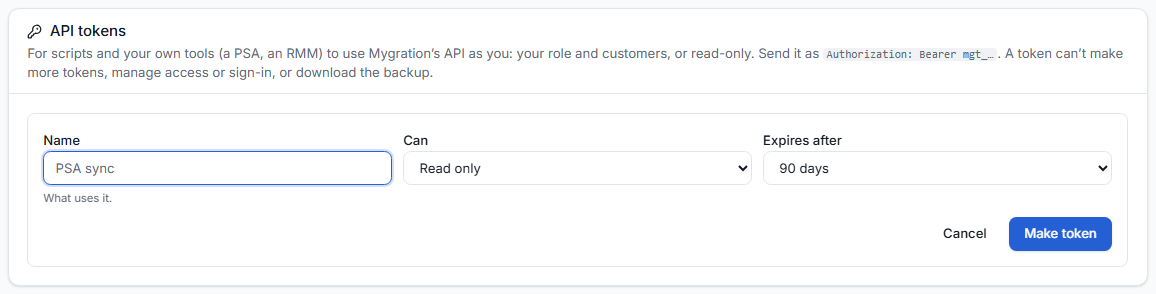
- Open My settings, to API tokens, and click New token.
- Give it a Name that says what uses it, such as PSA sync.
- Under Can, pick Read only or Everything my role can. Pick read only unless the tool needs to change things.
- Pick when it Expires after: 7, 30, 90, 180 or 365 days.
- Click Make token.
- Copy the token (it starts with
mgt_) and put it in your password manager or the tool's settings. It isn't shown again.
Your tokens are listed under the form, with when each was made, when it expires, and when and where it was last used.
Use it #
Send the token with every request, as a header:
Authorization: Bearer mgt_…Use the panel's https:// address only, and keep the token in your tool's secret store or a variable, not in a
script you share.
Your tool makes the same calls the panel does. To see which call does what, open the browser's developer tools on the panel (the Network tab) and use the panel as usual: each button shows the call it makes, with its address and what it sends. With curl, for example:
curl -H "Authorization: Bearer $MYGRATION_TOKEN" https://migrate.brightpathit.example/<the call's address>Note
While the server isn't licensed, a token can still read, but anything that changes something is refused. See Licensing and activation.
Revoke a token #
- Your own: My settings → API tokens, then Revoke next to it. Whatever uses it stops at once.
- Anyone's (admins): Tenant → Access → API tokens lists every token with its owner. Click Revoke on any that's no longer needed, or that might have been seen by someone it shouldn't.
Make a new token before the old one expires, and swap it in your tool.