Help · Selling and business tools
Usage and invoicing
What was moved for each customer in a month on System → Usage, how it's counted, and the CSV to invoice from.
Last updated
System → Usage shows what was moved for each customer in a month, ready to invoice from. Only admins can see it.
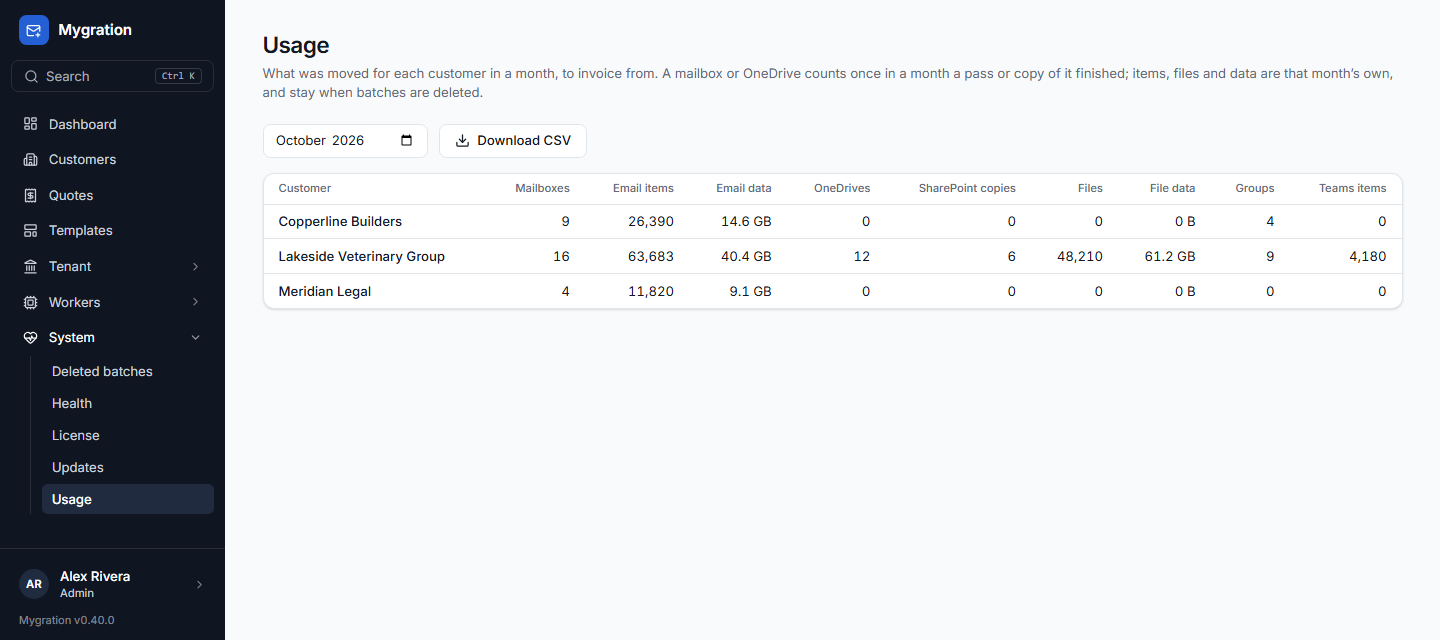
See a month #
- Go to System → Usage.
- Pick the month at the top. It opens on this month.
Each customer that had something copied that month has a row:
| Column | What it counts |
|---|---|
| Mailboxes | Mailboxes with a pass that finished in the month |
| Email items and Email data | Items and data copied in the month |
| OneDrives | People's drives with a copy that finished in the month: OneDrives, and home drives, Google Drives, Box and Dropbox accounts moved into OneDrive |
| SharePoint copies | Other file copies that finished in the month: SharePoint libraries and folders, file server shares, shared drives and team folders |
| Files and File data | Files and data copied in the month |
| Groups | Groups created in the month |
| Teams items | Teams items moved in the month |
How it's counted #
- A mailbox or OneDrive counts once in a month, however many passes it had. A mailbox that had passes in September and October counts in both months.
- Items, files and data are that month's own: what was copied in the month, not the total so far.
- Deleting a batch doesn't change past months. What it moved stays counted.
- Months follow the time zone set under Tenant → General.
Download the CSV #
Click Download CSV for the month shown. It has a row per customer with the same columns (data in GB), to import into your PSA or billing system or to attach to an invoice. Each download is recorded in the audit log.
A customer you've since deleted keeps its row for the months it had work.
On the customer's page #
Each customer's page shows what's moved for it this month, under Moved in (the month's name) in its details panel, with a link to Usage.