Help · Cutover and reporting
Sharing a status link with the customer
Make a read-only link that shows the customer's own people how their batches are going, and expire or revoke it.
Last updated
A status link is a read-only page for the customer's own people, such as their office manager: each batch's progress, its status and its next run, without signing in. It names no mailbox, file or person, only batches and how far along they are, so it's safe to forward inside their organisation.
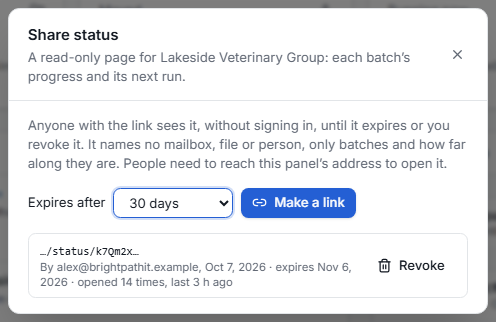
The screenshot shows the demo's Lakeside Veterinary Group.
Make a link #
- Open the customer. Click More (⋯) → Share status, or the Status page box under the customer's name.
- Under Expires after, pick how long it works: 7, 14, 30, 60, 90 or 180 days.
- Click Make a link.
- Click Copy and send the link to the customer.
Important
Copy the link straight away: it isn't shown again. If you lose it, make another and revoke the old one.
People who open the link need to reach your Mygration panel's address. A panel that's only reachable inside your own network can't be opened by the customer.
See who's opened it #
The Share status window lists the customer's links: who made each, when, when it expires, and how many times it's been opened (and when last). The strip under the customer's name shows Status page: Shared, with when it was last viewed, or Not shared.
Revoke a link #
- Open More (⋯) → Share status on the customer.
- Click Revoke next to the link, and confirm.
Anyone it was sent to can't open it any more. Links also stop working by themselves when they expire.
Read-only staff can see the links but can't make or revoke them.
What the customer sees #
Each of their batches with its progress, status and next run, carrying your logo and business name from Tenant → White label. For the full detail (each mailbox, file and group), send them the report instead: see Reports for the customer.