Help · Email migrations
Switching people's computers over
Download the batch's cutover script and run it on each PC, with Intune, a logon script or by hand, to move Office, Outlook, OneDrive and Teams to the new account.
Last updated
Once mail has switched over, each person's Office, Outlook, OneDrive and Teams still use their old account. The batch's cutover script moves them to the new one, on each Windows PC, for whoever is signed in. It's made for the batch, with everyone's old and new address in it, and leaves anyone not in the batch alone.
What it does #
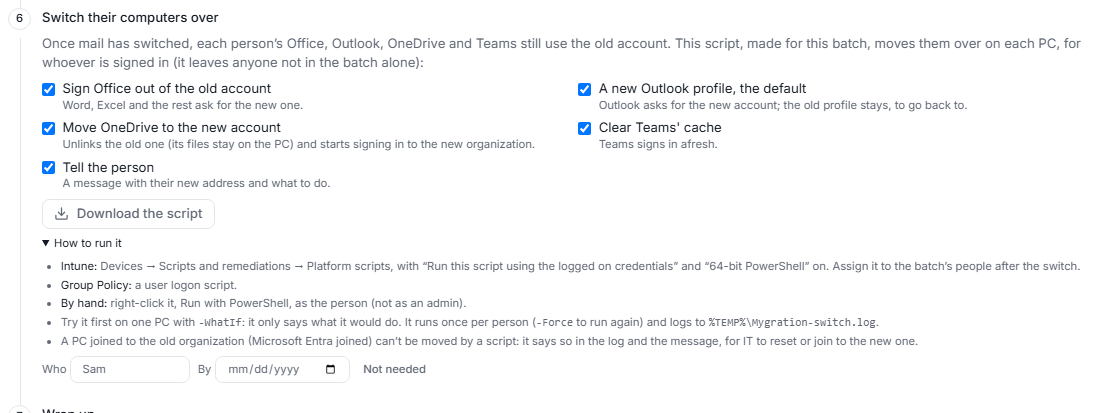
On the batch's Cutover tab, step 6, Switch their computers over, tick what the script should do:
- Sign Office out of the old account: Word, Excel and the rest ask for the new one. It also forgets the old saved sign-ins.
- A new Outlook profile, the default: Outlook asks for the new account. The old profile stays, to go back to.
- Move OneDrive to the new account: unlinks the old one (its folder stays on the PC, no longer syncing) and starts signing in to the new organization.
- Clear Teams' cache: Teams signs in afresh.
- Tell the person: a message with their new address and what to do.
Then click Download the script.
Try it on one PC first #
- Sign in to a PC as someone in the batch (not as an admin).
- Run the script with
-WhatIf. It only says what it would do. - Check the log:
%TEMP%\Mygration-switch.log. - Run it without
-WhatIf, and check Office, Outlook, OneDrive and Teams.
Run it for everyone #
Run it as the person, after mail has switched over:
- Intune: Devices → Scripts and remediations → Platform scripts. Add the script with Run this script using the logged on credentials and Run script in 64 bit PowerShell Host on, and assign it to the batch's people.
- Group Policy: a user logon script.
- By hand: right-click it, Run with PowerShell, as the person.
It runs once per person. To run it again for someone, add -Force.
What it leaves to IT #
- PCs joined to the old organization (Microsoft Entra joined) can't be moved by a script. The log and the person's message say so. Reset the PC, or join it to the new organization. On such a PC the script leaves Windows' own account alone.
- New Outlook (the app, not classic Outlook) keeps its accounts itself: people add the new account there.
- Phones and tablets: people add the new account in their mail and Office apps.
When it's done, tick the step on the Cutover tab.