Help · Customers and connections
Re-consenting a tenant after an update
When a new version needs a new Microsoft 365 permission, update the migration app's permissions once, then have each customer's tenant consent again.
Last updated
Some Mygration updates add something that needs a new Microsoft 365 permission: copying Planner plans, for example. Two things are needed then: the migration app gets the new permission once, in your MSP's tenant, and each customer's tenant consents again so the permission works there too.
What's new (under System → Updates) says when a release needs it.
1. Update the migration app's permissions (once) #
An admin does this, in your MSP's own tenant.
- Go to Tenant → Microsoft 365 apps.
- Under Set up the apps automatically, click Update permissions.
- The panel shows a code. Open the address it shows in any browser, enter the code, and sign in with an account in your MSP tenant that's an Application Administrator or Cloud Application Administrator.
- Wait for each step to finish. The last step, Customers re-consent, says whether customers need to: if nothing was new, it's skipped.

2. Have each customer's tenant consent again #
For each customer with a Microsoft 365 connection, source or destination:
- Open the customer and click Connections.
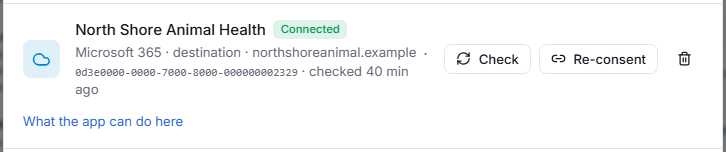
- Click Re-consent on the Microsoft 365 connection.
- A Global Administrator of that tenant opens the link and accepts:
- If you have admin rights in their tenant (through GDAP, say), click Open consent page and accept it yourself.
- Otherwise, click Copy link and send it to the customer's Global Administrator.
- Click Check on the connection.
Which tenants still need it #
- Check on a connection names any permission the tenant hasn't granted yet.
- What the app can do here, on the connection, marks what's missing as Not granted, with Re-consent as the fix.
- A batch that needs the new permission says so, and names the connection to re-consent.
Note
Right after consent, Microsoft can take a few minutes to apply it. If Check still shows something missing, wait a few minutes and click Check again.
Re-consenting doesn't change the migration app's Exchange role in the tenant: that stays as it was. See Connecting a customer's Microsoft 365 tenant and Troubleshooting: connections.