Help · Troubleshooting
Collecting a support bundle
Gathering what someone helping you needs, from the panel or from the server when the panel won't open, and turning on detailed logging for one batch.
Last updated
When you ask for help with a problem, send a support bundle. It holds what a helper needs to see: the version and settings, the workers, recent failures, and the recent logs. Passwords, keys and tokens are taken out, and nothing that was migrated is in it.
Note
Error messages in the bundle can still name mailboxes, folders and files. Look it over before you send it.
From the panel #
- Go to System → Health.
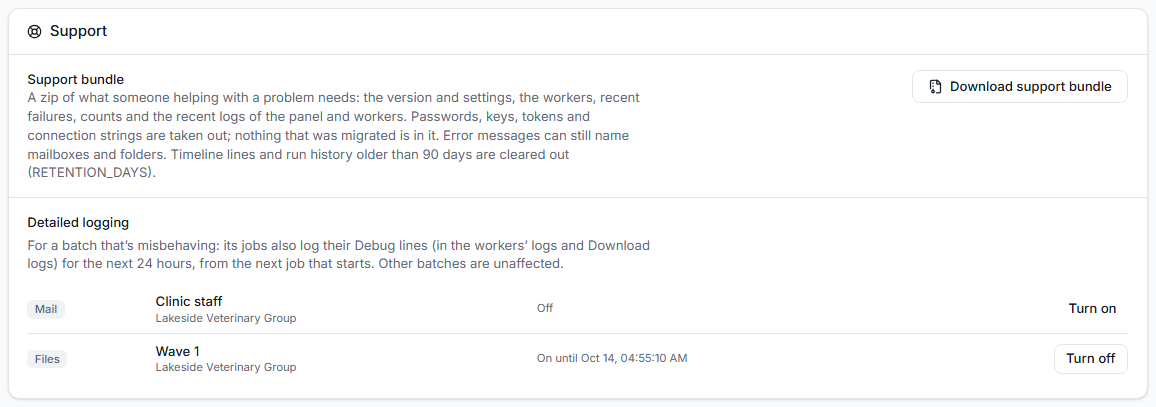
- Under Support, click Download support bundle.
It downloads a zip. Only admins can download it.
From the server #
When the panel won't open, collect one on the server instead:
sudo mygration support-bundleIt prints where it saved the file: a .tar.gz in /opt/mygration/support, readable only by root. Copy it off the
server (with scp, for example) to send it.
Detailed logging for one batch #
For a batch that's misbehaving, its work can log more detail for the next 24 hours:
- Go to System → Health, to Support → Detailed logging.
- Find the batch (only batches with work running or waiting are listed) and click Turn on. It says On until the time it stops.
- Run the pass or copy again, so the problem happens with the detail on.
- Download the support bundle, or the logs of a mailbox, copy or team from its page (its Logs button).
Other batches are unaffected. Click Turn off when you're done, or leave it to stop by itself.
What else to send #
With the bundle, say:
- What you were doing, and what you expected.
- The message you saw, word for word, or a screenshot.
- The customer and batch, and a mailbox or copy it happened to.
- When it happened, roughly.
For a worker at a customer's site, also send the end of its log: on that server,
docker logs --tail 50 mygration-worker.
Tip
Before you ask, check the mailbox's, copy's or team's own page. Its timeline usually says what failed and why. The other troubleshooting articles cover the common messages.