Help · Groups, Teams and Planner
Planner plans with groups and Teams
What of a Microsoft 365 group's or team's Planner plans comes across, the permission it needs in both tenants, and how updates work.
Last updated
When a groups or Teams batch makes a Microsoft 365 group or a team in the new tenant, it copies the group's Planner plans into the new group. There's nothing separate to set up beyond one permission.
Turn it on or off #
It's on by default. On the batch's Settings tab, untick Copy Planner plans to leave plans behind.
The permission it needs #
Copying plans needs the Tasks.ReadWrite.All permission for the migration app in both tenants. If a tenant hasn't given it, the groups and teams are still made, and the batch shows Planner: needs permission in the old tenant (or the new one).
- If the app hasn't got the permission yet, an admin opens Tenant → Microsoft 365 apps and clicks Update permissions.
- Click the link in the batch's message to open that tenant's connection, click Re-consent, and have the tenant's Global Administrator accept.
- Back on the batch, click Update now. The plans that waited are copied.
What comes across #
- Each plan's title and label names.
- Its buckets, in order.
- Each task's title, bucket, progress, priority, start and due dates, labels, place in its bucket, description, checklist and links, and who it's assigned to.
People assigned to a task who aren't in the new tenant yet are listed under Not found, left off their tasks, and added once their accounts are there.
Links into a SharePoint site that the customer's SharePoint, OneDrive or Teams migrations move are pointed at the copy. Other links stay as they are.
Where to see it #
The batch page has a Planner line under its progress: plans and tasks copied, and people not found. Each group's or team's page has a Planner card with every plan, its buckets, tasks copied, who wasn't found, and its status.
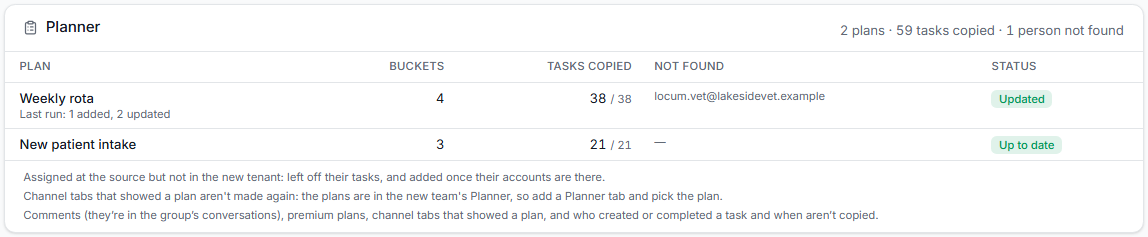
A plan's status is one of:
- Copied, Updated or Up to date.
- Waiting for Planner: Planner can refuse a group made minutes ago for a while. It's tried again on the next update.
- Not copied or Left as it is: with why, such as a plan of the same name already in the new group.
- Failed: with why. Update now tries again.
Updates #
Update now, the hourly update and Run automatically add new tasks and bring changed ones across (title, bucket, progress, dates, labels, people, details).
- Nothing is deleted. A task deleted in the old plan stays in the new one, and is noted.
- Plans and tasks Mygration didn't make are never touched.
- A plan of the same name already in the new group is left alone.
What isn't copied #
- Comments: they're in the group's conversations.
- Premium plans (Planner premium, once Project for the web).
- Channel tabs that showed a plan: add a Planner tab to the new channel and pick the plan.
- Who created or completed a task, and when: Planner sets those to the app and the copy's date.