Help · Email migrations
Old addresses: aliases and X500
How each mailbox's old addresses come across, why some wait for the domain, adding them at cutover, and making the original address primary again.
Last updated
Each new mailbox gets its old mailbox's addresses, so mail to them keeps arriving:
- X500: the old Exchange address, so replies to old mail and the addresses Outlook remembers still arrive instead of bouncing. Any X500s the mailbox already had come too. These go on at once.
- Aliases: every other address the mailbox had. These go on once their domain is in the new tenant.
Nothing on the old side changes. On the new mailbox, addresses are only ever added.
Where they're read from #
- Microsoft 365: with the migration app's Exchange role in the old tenant.
- Exchange Server: from Active Directory, through the Exchange connection's optional Domain controller. Without it, the old Exchange address still comes across.
- Google Workspace: aliases, read as the admin on the Google connection.
- IMAP: IMAP has no list of aliases. Add them to the new mailboxes by hand.
Turn it on or off #
It's on for every batch: the batch's Settings tab, Email addresses, Copy email addresses (aliases and X500). Untick it to leave addresses alone.
See what came across #
Addresses are read after each mailbox's first full pass, or its pre-stage.
- The batch page sums them up in one line: how many were added, how many are waiting for the domain, and any problems. CSV downloads every address with what became of it.
- Each mailbox's page lists its addresses under Addresses, each with its status.
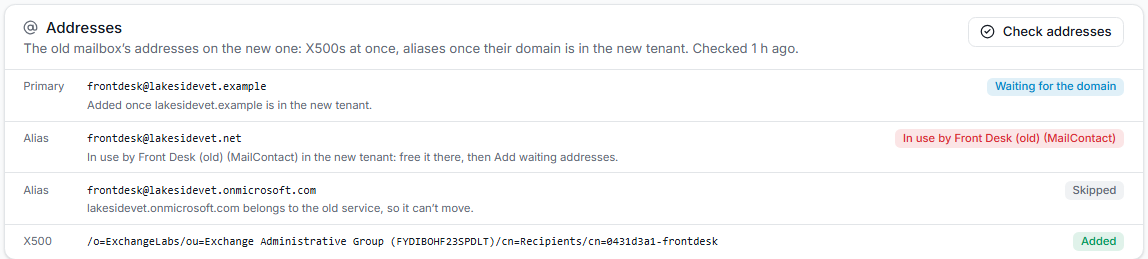
| Status | What it means |
|---|---|
| Added or Already there | Done. |
| Waiting for the domain | The new tenant doesn't have that domain yet. It's added once it does. |
| In use by … | Someone else in the new tenant has it, such as a contact someone made. Free it there, then add the waiting addresses. |
| Add in Active Directory | The new account is synced from Active Directory, where Exchange Online can't add addresses. The batch's CSV lists them, to add there. |
| Skipped | It can't move: an address on the old service's own domain (.onmicrosoft.com), or another kind of address such as SIP. |
An address someone else has in the new tenant is reported, never taken over.
Add the waiting addresses #
Aliases on a domain the new tenant doesn't have yet wait for it. In a same-domain move, that's until the domain moves on cutover day.
Once the domain is added and verified in the new tenant:
- Open the batch's Cutover tab and find Add the old addresses.
- To make each mailbox's original primary address its primary again, tick Make each mailbox's original primary address its primary again. It only changes mailboxes where that domain is now in the new tenant. Sign-in names don't change.
- Click Add waiting addresses.
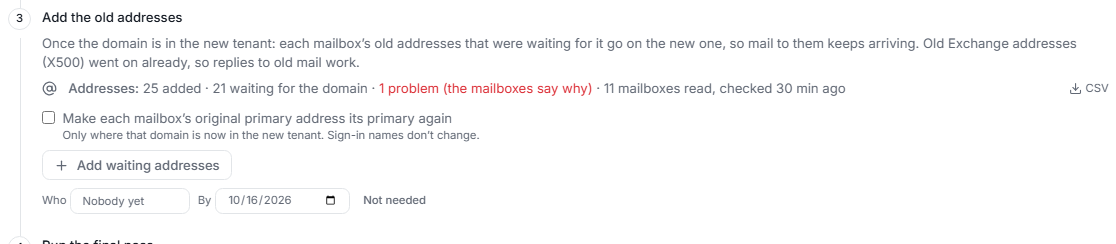
Add waiting addresses is on the batch page's addresses line too, without the primary option. On one mailbox's page, Check addresses does the same for that mailbox.
See Same-domain moves for the whole cutover order.
In the report #
The batch, migration and customer reports have an Email addresses section: how many old addresses came across, the domains that aren't in the new tenant (with how many addresses stay behind on each), and every address not added, with why.